OrbitWork

Hand the work to OrbitWork. Keep the know-how in your company.

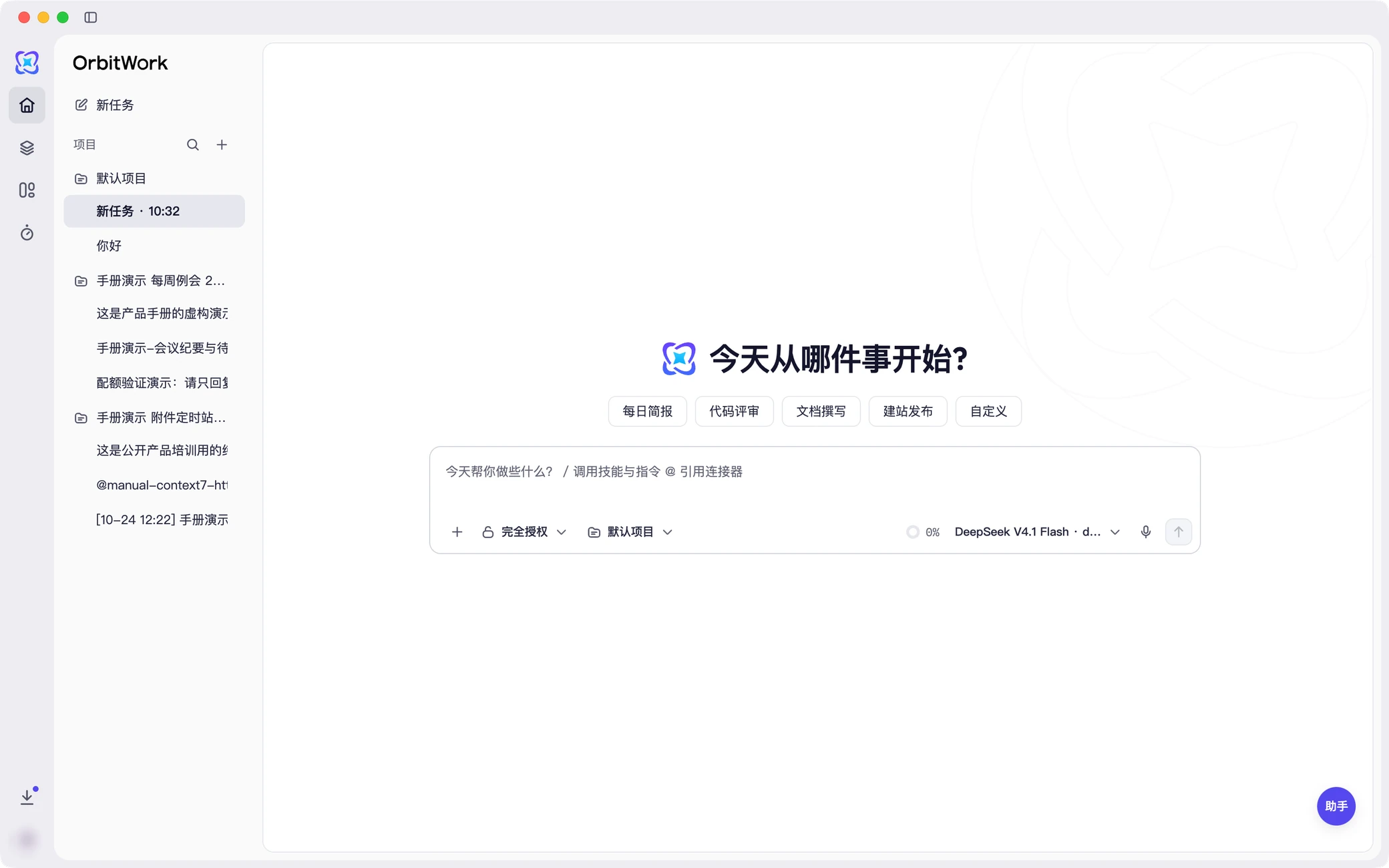
DownloadThe OrbitWork desktop app on the new-task page: projects and tasks on the left, “Where shall we start today?” in the middle, with the input box and common tasks below. Product preview shown in Chinese.

Product preview shown in Chinese.

Say it once, get finished work back

Closed-loop tasks
Request to delivery

A chat tool gives you an answer; OrbitWork gives you finished work. Understanding, planning, execution and checking all happen in one engine.

  • Asks a few questions first when the request is unclear
  • Breaks the work into steps and decision points
  • Uses skills and connectors inside a sandbox
  • Checks and fixes its own work before delivery

Four core capabilities
Gets better with use

Skills and experts decide what it can do, scheduled tasks let it run on its own, and connectors bring it into the systems you already use.

  • Skills: 100+ built in
  • Experts: preset by role and industry
  • Scheduled tasks: run on a timer or on events
  • Connectors: 30+ common systems

Fits your systems
No migration bill

Keep your collaboration, document, storage, engineering and business systems. OrbitWork adapts to them, not the other way round.

  • DingTalk, WeCom and Feishu
  • Online docs, knowledge bases and cloud drives
  • ERP, CRM, finance systems and databases
  • We build and maintain the integrations

Pick any model
Usage that adds up

Connect domestic, open-source, commercial or self-hosted models and switch at any time. Usage is easy to see and can be billed.

  • One API layer for every model
  • Bring your own self-hosted models
  • Set model policies per organization
  • Split usage internally or bill it externally

Desktop apps
Availability by release

Windows and macOS apps are available. Linux packages appear as released. HarmonyOS and Xinchuang systems such as UOS and Kylin are planned. Includes built-in browser and computer use.

  • Local sandbox adapted per platform
  • Tasks scheduled centrally in the cloud
  • Long tasks don't need your computer on
  • Clear permission scope, every action logged

Three products
One foundation

OrbitWork does the work with the knowledge base built in; OneID handles identity and TokenHub handles models and metering.

  • OrbitWork: the general-purpose desktop agent
  • Knowledge base: built into the desktop app and Console, with cited answers
  • OneID: unified identity and permissions
  • TokenHub: model access, metering and billing

Neutral, embeddable, on-prem

Neutral

Not tied to any IM or ecosystem. Partners can install it in their customers' data centers.

Task-first

Built around the task and keeps going until the job is done, instead of stopping at suggestions.

Embeddable

Platform name, domain, sign-in page and identity source can all be your own.

On-prem

Deployed on-premises, data stays in your data center. Offline deployment is supported; Xinchuang support is planned.

Identity, metering and backupsstay in your hands

Your identity

OneID is deployed on its own and connects to your identity source and sign-in page. Accounts stay with you, not with a third-party IM.

Your metering

TokenHub meters independently. You set token sources, billing and settlement rules, and can swap models at any time.

Your backups

Independent backups on your own policy: back up site data as needed and keep the backup storage on your side.

Boundaries and audit

The agent only works within what it is authorized to do: sandbox isolation, masking of sensitive data and a full audit trail, so admins can see who did what, and where.

An OrbitWork conversation: the agent lists the file operations and commands it can run and waits for your confirmation. Product preview shown in Chinese.

Product preview shown in Chinese.

Install it in your own data center

Four ways to deploy, from a quick trial to province-wide use across departments. On-premises is not a cut-down edition: offline deployment, in-region data and independent backups all work in full.

DeploymentRuns onIsolationBest for
Public cloudPublic cloudPer organizationTeams that want to start fast; departmental pilots
Co-brandedBrand cloudPer brandSoftware vendors operating under their own brand
On-prem single-tenantYour data centerOn-premisesGovernment and enterprises with data residency or MLPS requirements
On-prem multi-tenantYour data centerOn-premisesCounty, city and provincial government; groups shared across departments

Try it on the task in front of you

Install the desktop app and hand it the task at hand. Deploy on-premises and your data never leaves your data center.

Download